Architecture
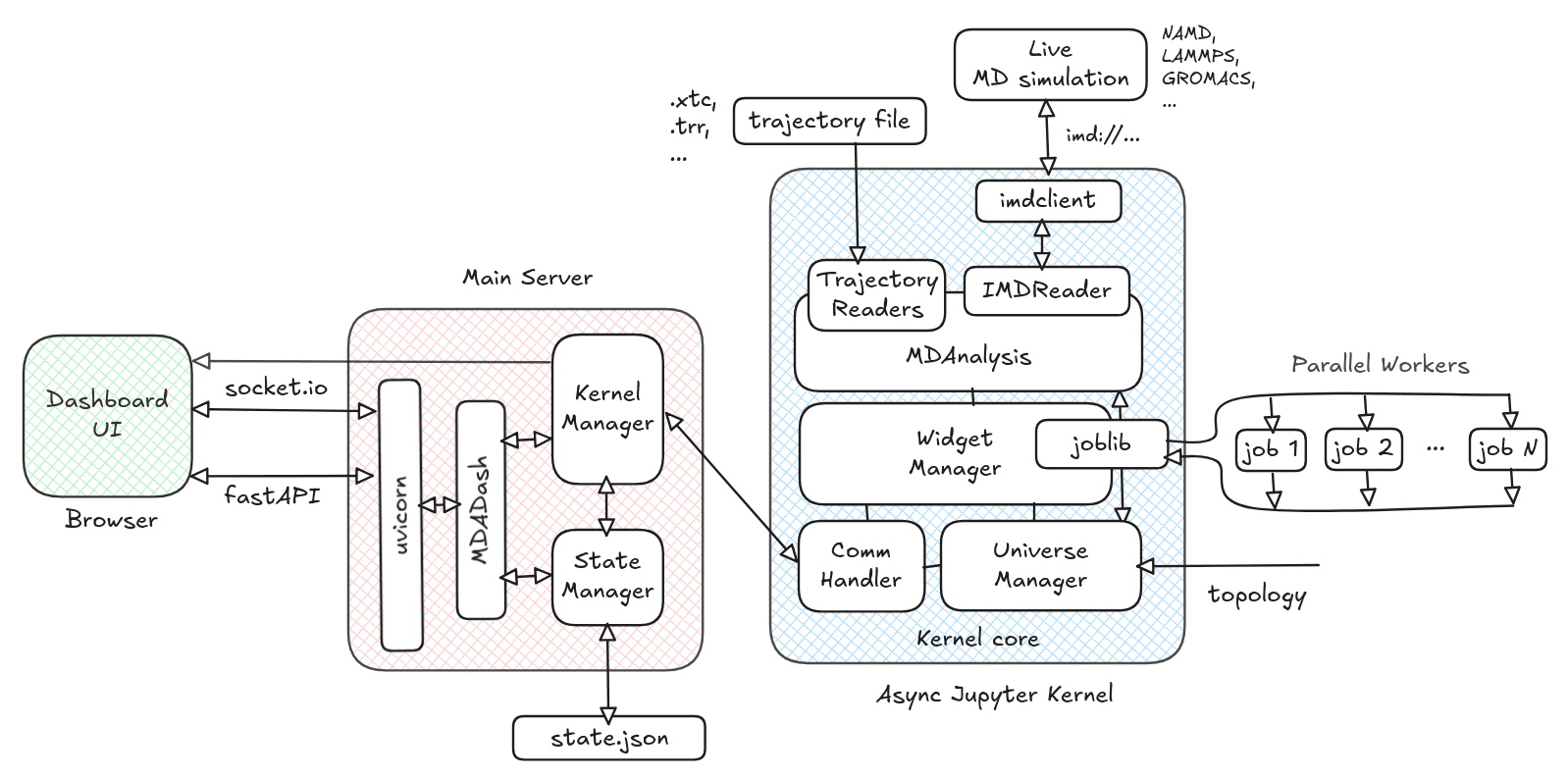
mdadash is a Python command line tool. It launches a uvicorn based web server that uses FastAPI framework combined with python-socketio to serve a web based dashboard that can be accessed from a web browser.
A high-level architecture of mdadash looks as follows:
Processes
Main Server
The main server process runs the web server and handles all interaction with the dashboard clients (Browsers). It consists of the MDADash, Kernel Manager and State Manager components.
Async Jupyter Kernel
The Main Server process launches an Async Jupyter Kernel using jupyter_client’s AsyncKernelManager, which runs as a separate process. All the Universe management and Widget management that includes execution of Widgets happens in this process. It consists of Widget Manager, Universe Manager and Comm Handler components.
Parallel Workers
When Widgets are configured to run in parallel, additional processes could get launched which execute the analysis code within them in parallel.
See also
For more details see Parallelization
Components
MDADash
This component runs in the Main Server process and registers handlers for all the socket.io events that could be received from the Dashboard UI. It also creates singleton instances of the Kernel Manager and State Manager components that run within the Main Server process.
Kernel Manager
This component is implemented by the KernelManager
class. It is responsible for managing the AsyncKernelManager (starting it, stopping it)
and handling all communication to and fro from it by interfacing with the Comm Handler
component on the Async Jupyter Kernel side. Because the Async Jupyter Kernel runs as
a separate process any communication with it has to go through this component.
State Manager
This component is implemented by the StateManager
class. It is reponsible for managing the entire state of the dashboard application. It
persists the state to disk and also restores it back when the server is re-launched.
The entire state is maintained as a json file. By default, a file named mdadash.state.json
in the current working directory from where mdadash is launched is used as the state file.
This can be customized using the --state-file command line param of mdadash.
Note
Widgets outputs are not maintained in the state file.
Widget Manager
This component is implemented by the WidgetManager class.
It is responsible for managing the entire lifecycle of Widgets - listing, adding, deleting,
duplicating, re-creating, handling inputs and running them.
All Widgets derive from the WidgetBase class. This class
implements __init_subclass__ method to register all widget classes automatically with the
WidgetManager.
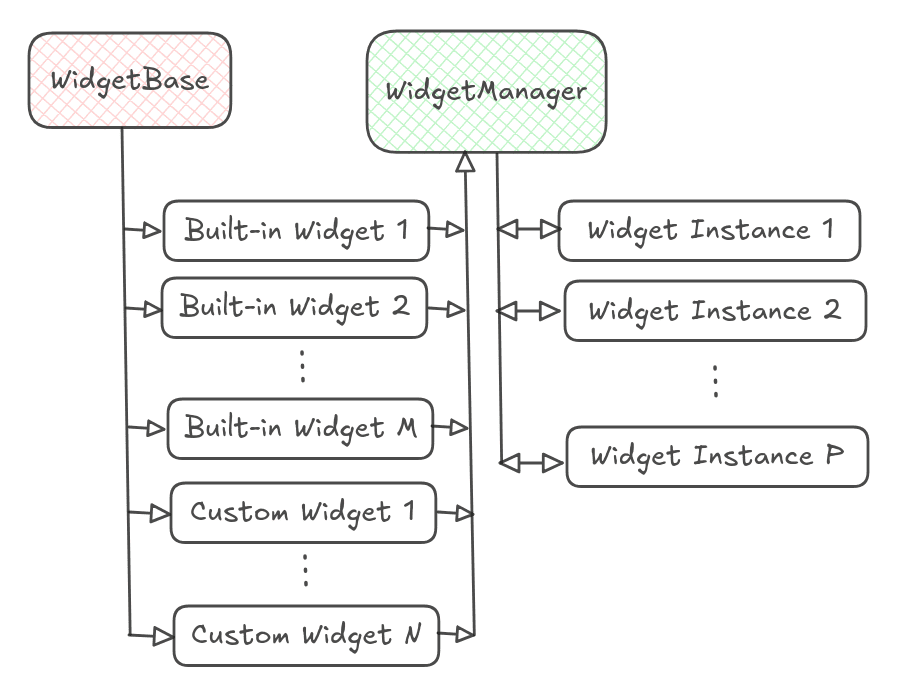
WidgetManager is thus able to provide the list of available
Widgets to the dashboard UI and create instances from those classes to manage them as shown above.
WidgetManager uses joblib to run Widgets in separate
processes if they are configured to run in parallel (see: Parallelization). It is responsible
for collecting the parallel jobs from the Widget instances, executing them and applying the parallel
results back to the respective Widget instances.
See also
For more details about Widget internals, see Adding Custom Widgets
Universe Manager
This component is implemented by the UniverseManager class.
It is responsible for managing the MDAnalysis Universe. It registers handlers with Comm Handler
to handle connect / disconnect and pause / resume events. It uses an asyncio_task to run the
trajectory iteration loop and invokes the WidgetManager
to run the Widget instances during this iteration.
Comm Handler
This component is implemented by the CommHandler class. It is
responsible for handling all communications to and from the kernel. It uses comm to handle
communications as per the standard Jupyter Kernel protocol’s Comm framework. It interfaces with the
Kernel Manager component on the Main Server side.
Dashboard UI
The Dashboard UI is built using Vue.js framework and Vuetify components. It uses socket.io for real-time bi-directional communication with the mdadash server (Main Server).
The UI provides an easy way to add Widgets. It provides a dynamic resizable grid layout along with search / filtering support to display Widget outputs. It provides an auto-generated layout for Widget inputs and handles input changes in real-time. It also provides a Notebook interface to create Notebooks with code complete and inspect support to allow users to write custom analysis code and add custom Widgets (see Adding Custom Widgets).