Parallelization
mdadash supports running Widgets in parallel. It uses Joblib with the default
loky backend to run the parallel jobs as separate processes. A global “Parallel Jobs”
under “Settings > Dashboard Configuration” in the dasboard controls the total number of jobs
that can run in parallel (n_jobs param for joblib.Parallel call).
All the analyses that run in mdadash are CPU-bound and hence a Process-based parallelism is chosen instead of Thread-based parallelism.
IMDReader uses imdclient to connect to a live MD simulation. Because of the use of a network socket within imdclient, this is not serializable by default. mdadash patches IMDReader to remove imdclient from the serialization state since the trajectory is never iterated using imdclient within a parallel job. This makes parallelization possible within mdadash for streaming trajectories.
A Widget class that supports a parallel _run_mode must implement
get_parallel_job() and
apply_parallel_results() methods.
Here is the Widget execution flow when there are parallel Widgets to be run:
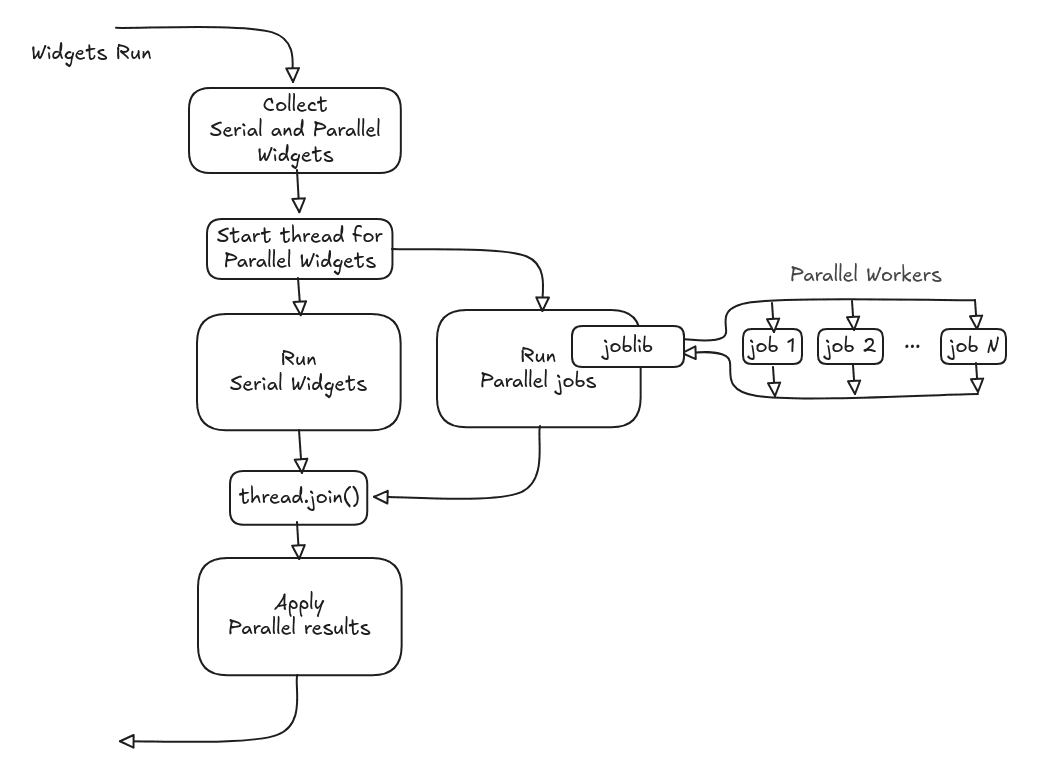
As mentioned in the docs for the
get_parallel_job() and
apply_parallel_results() methods, everything
needed by the Widget class (ouputs, updated internal state, etc) must be explicitly returned
back as return values from the parallel job and applied back to the Widget.
Given the choice of Process-based parallelism, there will be serialization and de-serialization
overheads involved when Widgets run in parallel mode. The type of analysis and the use of
batching should be considered when choosing the parallel _run_mode for
Widgets.
Tip
Batching can be used with Parallelization to limit the impact of the serialization and de-serialization overhead.
The list of all the Widgets that can be run in parallel can be found on the Built-in Analysis Widgets page.